
Wondering how to code your BMW digital speedometer for precise speed readings and personalized settings? This guide provides all the steps, tools required, and benefits of BMW digital speedometer coding in a straightforward manner.
Key Takeaways
- Digital speedometers offer real-time accuracy and reduced errors compared to analog gauges, making them safer for driving.
- Coding your BMW digital speedometer with the Carly app enhances accuracy and allows for personalized settings like speed units and display layout.
- Maintenance is key for a coded speedometer’s longevity, and it’s important to stay aware of local laws regarding coding to avoid legal issues.
Understanding Digital Speedometers

Digital speedometers have become an essential feature in modern vehicles due to their precision and reliability. Unlike traditional analog speedometers, digital speedo provides accurate real-time speed readings, reducing parallax errors that often affect analog gauges. This ensures that the information displayed reflects your actual digital speed more closely, which is crucial for safe driving.
Modern digital displays have addressed earlier concerns about refresh rates and lag. Today’s digital clusters are designed to be responsive, ensuring that the digital readout speed is up-to-date and reliable. These advancements make digital speedometers not only a practical choice but also a preferred one for many drivers.
Why Code a BMW Digital Speedometer?
Coding your BMW digital speedometer can significantly enhance the accuracy of your speed readings, ensuring that what you see on your digital display matches your actual speed. This is particularly important for maintaining compliance with speed limits and avoiding potential fines. Moreover, coding allows for personalized settings, enabling you to adjust features according to your preferences, such as switching between mph and kph, or customizing the display layout.
The Carly app simplifies the process of diagnosing and recoding your BMW, making it accessible even for those without technical expertise. However, it’s essential to ensure that any modifications, including speedometer coding, comply with local regulations to avoid legal complications.
Tools You Need for Coding
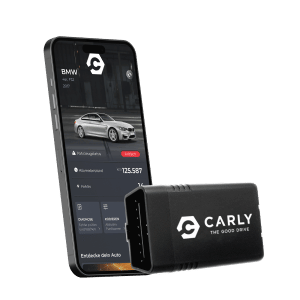
You’ll need a few tools to start coding your BMW digital speedometer. The Carly Universal Scanner is indispensable for this process. It’s a versatile tool specifically designed for coding and diagnosing BMW vehicles.
Step-by-Step Guide to Coding Your BMW Digital Speedometer
Correct coding is vital when installing new electronic components in your BMW to avoid error messages and ensure proper functionality. Speedometer inaccuracies can occur after coding, so following the correct steps is essential for achieving accurate speed display. This guide covers the preparation, connection, and coding process.
Begin by preparing your vehicle, then connect the Carly scanner, and follow the coding process to customize your digital speedometer. Each step is designed to ensure a smooth and successful coding experience.
Preparing Your Vehicle
For BMW 5 series models from 2016 to 2020:
- Locate the OBD-II port under the panel on the left side of the driver’s seat.
- Plug in the Carly scanner into the OBD-II port.
- Start the vehicle’s ignition.
Start the ignition after plugging in the Carly scanner to power up the vehicle’s systems. This initial setup prepares the vehicle for coding.
Connecting the Carly Scanner
Next, follow these steps to set up the Carly app and scanner:
- Download the Carly app from your phone’s app store.
- Connect the Carly scanner to your phone.
- After you install the app, plug in the Carly OBD reader.
- Establish a Bluetooth connection by selecting the scanner within the app interface.
Turn on your vehicle’s engine, enable Bluetooth on your phone, and open the Carly app to establish the connection.
Coding Process
Once connected, begin the coding process. Carly provides:
- Real-time data and diagnostics to monitor your vehicle’s performance effectively.
- A comprehensive framework for coding operations.
- The setup process needed for effective coding.
Follow the app’s instructions to customize your digital speedometer by adjusting the speed unit, changing the setting display, and removing persistent error messages.
Troubleshooting Common Issues
Error messages on the BMW dashboard can often be permanently removed through specific error message removal services that have been edited. Regular calibration checks against a GPS device can help identify discrepancies in speedometer readings that can happen.
Ensure that the cable linking the transmission to the speedometer is lubricated and free from damage to maintain accurate readings. Regular maintenance can prevent many common problems.
Benefits of Using Carly for BMW Coding
Carly is highly recommended for BMW coding due to:
- Its ease of use
- Its versatility, allowing users to modify various car features without professional assistance
- Being designed specifically for BMW vehicles
- The Carly Universal Scanner being a reliable tool for customizing settings efficiently.
One significant advantage of Carly is its ability to clear fault codes quickly, saving time and money compared to dealership charges. Carly also provides access to a wide range of coding options not available through standard dealership services.
Enhancing Your Digital Cluster Experience
Coding can greatly enhance your digital cluster experience. Digital speedometers allow for customizable displays, enabling drivers to focus on the most relevant information for their driving mode. The Carly app allows you to customize the digital speedometer display settings, including options for speed unit preferences in the video format.
Using Carly allows you to personalize various features of your BMW, enhancing your driving experience and vehicle functionality. Adjust performance features like throttle response or set specific preferences for your digital speedometer display; the possibilities are extensive.
Maintaining Your Coded Digital Speedometer
Regular maintenance is crucial for ensuring the longevity and accuracy of your coded digital speedometer. A standard diagnostic report on the instrument cluster can identify underlying problems. Regular vehicle maintenance, including servicing the transmission, supports the speedometer’s overall accuracy.
Temporarily disconnecting the car battery to reset the BMW instrument cluster can resolve issues like malfunctioning lights or erratic gauges. Monitor for excessive vibrations and protect the dashboard from extreme temperatures to maintain the speedometer’s functionality.
Legal Considerations
Consider the legal implications when coding your BMW’s digital speedometer. Automated vehicles, which may assume a bit of digital speedometer functions, are subject to specific legal rules that govern their use, including the Automated and Electric Vehicles Act.
The legal implications of using a coded digital speedometer vary by jurisdiction, so be aware of local posting rules and compliance standards. Failure to adhere to these laws can result in fines or complications during vehicle inspections.
Summary
Mastering BMW digital speedometer coding opens up a world of customization and improved accuracy. By understanding the importance of digital speedometers, knowing why coding is beneficial, having the right tools, and following a detailed step-by-step guide, you can enhance your driving experience significantly. Troubleshooting common issues, using Carly for BMW coding, and maintaining your coded speedometer will ensure long-term satisfaction.
In conclusion, with the right approach and tools, coding your BMW digital speedometer is a straightforward process. Embrace the opportunity to make your driving experience more personalized and accurate. Happy coding!
Frequently Asked Questions
What is the starting price of the Carly Universal Scanner?
The Carly Universal Scanner starts at €64.80.
What feature does the Carly scanner provide regarding vehicle faults?
The Carly scanner lets you clear fault codes, which helps you save both time and money instead of going to a dealership. It’s a handy tool for keeping your car running smoothly!
What is the first step to use the Carly scanner?
Just plug the Carly scanner into your vehicle’s OBD-II port to get started. That’s all you need to do for step one!
Where is the OBD-II socket typically located in a vehicle?
You’ll usually find the OBD-II socket in the footwell under the panel on the left side of the driver’s seat. Just check there, and you should be good to go!
What should you do after plugging in the Carly scanner?
After plugging in the Carly scanner, just turn the ignition to power up your vehicle’s systems. That’ll get everything ready for a smooth scan!