
your code your vehicle yourself is no longer rocket science these days. With the right tools, a little know-how and a basic technical understanding, you can do it with ease. With a little practice, you can conjure up very cool features from your vehicle with vehicle coding. But be careful … you must not overdo it or change the coding in such a way that it causes problems with the operational safety of the vehicle.
How can I code my car myself? To be able to code your car yourself, you need an adapter which usually costs around €150. However, there are often additional costs for certain cables or readers, which cost around €30 or more, depending on where you buy them. In addition, the coding is very complicated and takes hours of research. The Carly app offers an alternative. This allows you to code your vehicle from the comfort of your own home for just over €100.
GAIN MORE CONTROL OF YOUR CAR WITH THE CARLY FEATURES
Check the exact pricing of Carly for your car brand!

Fast International Shipping with DHL

14 days adaptor return policy

Excellent customer support

Lifetime warranty in the hardware
SEEN IN







We will also show you what dangers await you when coding yourself and one or two tricks for better coding. Audi VW vehicles are known for their high-quality workmanship and their wide range of coding options, even with the Mini car code.
Old car – new design
If you have been driving a vehicle for some time, you may feel the need to give it a new look. By coding a few new features, you’ll get a whole new driving experience. You get into the car and you might be greeted by a new color scheme or you can give the speakers a new sound. Switch on the sports display and have information on power and torque shown in red on the display. Or or or. You can achieve a really different feeling when you get in and drive by making small changes to the coding. So treat yourself to a little change every now and then. Many owners of Audi VW models use special software to carry out individual vehicle coding on their cars.
Vehicle coding – What can I code?
The possibilities for vehicle coding are almost unlimited. Each vehicle type naturally has its own settings and coding options. Your vehicle can do so much more than what is set as standard on delivery – from the interior lighting and warnings to the sensors for light or rain, countless individual settings can be made. Very often there are up to ten different options per area. You can spend quite some time with this.
You need the right tool
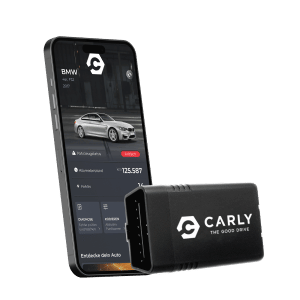
You need technical aids to code your baby yourself. Please don’t get the idea of trying to code your car with some black copy of dubious software. This can be very dangerous for you if something does not work as it should (e.g. airbags). Only use licensed products. In our opinion, we recommend the Carly app. An app for your smartphone with which you can easily and legally access the vehicle coding of your vehicle. Simply install the Carly app on your cell phone, connect the OBD scanner (on-board diagnostics) to your vehicle and trailer and off you go. With the Autocode Mini, you can do the vehicle coding yourself without the help of a specialist.
What can be coded?

The possibilities for vehicle coding are almost endless and of course depend primarily on the vehicle type and the equipment purchased. The user-friendly interface of the Autocode Mini makes it easy even for beginners to adjust various vehicle coding settings in the vehicle.
Let’s take the example of the Mini F60. Similar coding can certainly be found for your vehicle type. Below are some of the many areas and setting options:
Active Sound Design
With this function, you can set whether you want to have an amplified engine sound in the interior, which is played back via the loudspeakers.
indicator
How often should your blinker flash when briefly tapped? Should the blinker flash 1, 2, 3 or not at all when the vehicle is locked or unlocked? Should the blinker flash when the alarm is activated or not?
Window regulator
How should the window regulator behave in different situations? Should the windows be lowered when the door is opened? Should the window regulator stop when the door is opened? Should the windows close again after the door has been opened? And so on. As you can see, even with something as supposedly simple as the window regulator, you can try out many different options.
Rain-light sensor
The sensor for the light (automatic switch-on) and the rain (start of the windshield wiper) can also be set. The options for the Mini F60 are: very sensitive, sensitive, normal, insensitive, daytime running lights and standard. Simply try out several variants until you have found the vehicle coding that suits you best for your car.
Wiping water
You can code various options for the windshield washer system. For example, when do you want to be reminded that the wiper water is running low? How often should the windshield wiper move after being switched on and how long should the individual wash cycles be? At what vehicle speed should the speed of the windshield wiper be reduced? Or should the rear window wiper always be running when reversing? You wouldn’t believe all the things you can set for cleaning and windshield wipers. And this was just an excerpt – there are many more variants. Simply work your way through the clear vehicle coding menu of the Carly app or the Autocode Mini.
Seat belt reminder
There are a myriad of possible settings for the seat belt reminder. But please be careful and responsible. Even if you find the reminder to wear your seatbelt annoying, you should refrain from completely switching off the vehicle coding in the car. You can, for example, set the system to remind you only after you have driven 500 or 1,000 meters or at a speed of 20 km/h or more. By then you will hopefully have worn your seatbelt anyway. You could also set the alarm to only last 5 seconds and not annoy you for two minutes.
Most of you will certainly also want to switch off the seatbelt reminder so that it sounds as soon as you switch on the ignition or when you unbuckle your seatbelt. The main thing is to always think about everyone’s safety first and then decide which vehicle coding functions make sense for you and which do not.
These examples should give you an idea of what is possible. There are around 50 menu items and countless sub-items that can be accessed, including via Autocode Mini. But beware … it can also be dangerous.
What are the dangers of self-coding your vehicle?
If you are considering making changes to the vehicle coding, it would be wise to consult the manufacturer or workshop by e-mail beforehand. They can tell you exactly which changes are possible without any problems and which could lead to conflicts in the vehicle coding. Expert advice is worth its weight in gold here and can prevent problems later on.
Sometimes updates or important information regarding the vehicle settings are sent by e-mail from the manufacturer or workshop. So look out for such notifications in your mailbox to make sure you are always up to date.
Even if you are an experienced hobbyist, it can’t hurt to send an e-mail to the workshop after making changes to the vehicle coding on the car or trailer. If necessary, they can take a look at the changes and make recommendations for optimization. This will ensure that everything is in the green and that the car has no defects.
Finally, it would be advisable to set up an e-mail distribution list for vehicle and trailer updates and important messages. This way, you will always be informed of any developments that could affect your vehicle coding and can act in good time before any problems arise.