
Frustrated with your BMW’s auto start-stop feature? Our guide on start-stop BMW coding explains how to customize or disable it to better fit your driving style.
Key Takeaways
- BMW’s start-stop technology improves fuel efficiency by shutting off the engine during stops, which is particularly beneficial for city driving.
- Drivers can customize their BMW’s start-stop system through coding, allowing for personal preferences and enhancing the driving experience.
- Using the Carly app with the Carly adapter makes it easy to code the start-stop system and access other vehicle diagnostic features.
Understanding BMW Start Stop Technology

Since 2008, BMW vehicles have been equipped with the auto start-stop system, a technology designed to enhance fuel economy and reduce emissions. The system can lead to fuel savings of 3% to 12% by shutting down the engine automatically when the vehicle stops, such as at traffic lights or in heavy traffic, utilizing the auto stop feature. This is particularly beneficial for city drivers who frequently deal with stop-and-go traffic.
The start-stop function primarily aims to reduce idle time, which is a significant contributor to unnecessary fuel consumption and emissions. When the engine is not running while the car is stopped, no fuel is being burned, which directly translates into lower fuel usage and fewer emissions. If the feature is inconvenient during traffic jams, BMW provides a manual override button on the dashboard to disable the stop start function.
Optimal performance of the start-stop system is achieved under specific conditions: the engine must be warmed up, the battery sufficiently charged, and the air conditioning or heating should not be in heavy use. Customizing when the engine shuts off can further optimize fuel efficiency, especially in high-idle scenarios.
How Does the BMW Start Stop System Work?
The BMW start-stop system is designed to conserve fuel and reduce emissions by powering down the engine when the vehicle comes to a complete stop. This intelligent system distinguishes between brief pauses and full stops to ensure the engine doesn’t restart unnecessarily. This means that at a brief stop, like a stop sign, the engine might not turn off at all.
A central control unit monitors engine inactivity through various sensors, ensuring the system operates safely and effectively. These sensors provide data to the control unit, which makes real-time decisions about when to engage the start-stop function. For instance, the system prevents activation if the engine is cold or the battery level is low, ensuring the vehicle’s reliability and performance are not compromised.
These safeguards ensure the start-stop system enhances fuel efficiency without compromising the driving experience. A good grasp of these mechanics can help drivers appreciate the sophistication of this feature and fully utilize its benefits, bringing a light to the advantages it offers.
Why Consider Coding Your BMW’s Start-Stop System?
Many BMW drivers find the default auto start-stop settings inconvenient, especially in frequent stop-and-go traffic situations. Coding your BMW’s start-stop system allows you to disable the auto start-stop function permanently or customize it to better suit your driving habits. This customization can significantly enhance your driving experience by giving you more control over your vehicle’s behavior.
One of the notable advantages of coded coding is the ability to maintain the last state of the start-stop function. This means the vehicle can remember your last used settings through its memory function, which is particularly convenient for drivers who prefer a consistent driving experience. Additionally, coding can help reduce the frustration and annoyance that some drivers feel towards the default start-stop feature.
Moreover, BMW vehicles are built with specialized batteries and starters designed to handle the frequent start-stop cycles, ensuring durability and reliability. Therefore, customizing the start-stop system does not compromise the vehicle’s components but rather enhances user satisfaction and driving convenience.
Tools Needed for BMW Start-Stop Coding
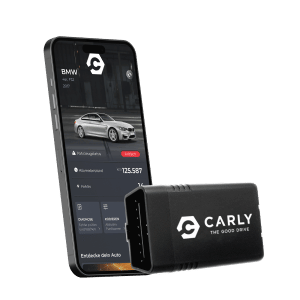
A reliable tool is necessary to code your BMW’s start-stop software system. Carly is widely recognized as the preferred tool for this purpose. Carly offers a user-friendly interface and a comprehensive set of features that make it easy to customize your vehicle. The Carly Universal Scanner, which provides Bluetooth connectivity, is essential for seamless communication with your BMW.
Once you have the Carly adapter, the next step is to download the Carly app from the App Store or Google Play Store. This app is necessary to access the coding features and make adjustments to your vehicle’s settings. The Carly adapter connects to the OBD-II socket in your vehicle, typically found under the dashboard near the driver’s seat. This socket allows for easy access to the car’s diagnostic systems, making the coding process straightforward.
With the Carly adapter and app, you can not only code your start-stop system but also perform a variety of diagnostic checks and maintenance tasks with the latest version, adding significant value to your vehicle ownership experience. Additionally, the app is compatible with many modern cars.
Step-by-Step Guide to Coding Your BMW Start-Stop System

Coding your BMW start-stop system can seem daunting, but it’s a simple process with the right tools and guidance. This step-by-step guide will walk you through preparing your vehicle, using the Carly app, and applying bmw coding changes to ensure your start-stop system works exactly how you want it.
Preparing Your Vehicle
The first step in coding your BMW’s start-stop system is to prepare your vehicle:
- Locate the OBD-II port, which in BMW 5 series G30/G31 models (manufactured from 2016 to 2020) is under a cover on the left side of the driver’s seat.
- Plug the Carly adapter into the OBD-II socket, usually found in the footwell area.
- Ensure the adapter is securely connected to allow for proper communication with the Carly app.
For the start-stop feature to be active, certain conditions must be met:
- In automatic transmission vehicles, the engine shuts off when the brake pedal is pressed after a complete stop.
- In manual vehicles, pressing the clutch and shifting to neutral will shut off the engine.
- The car must be in ‘Drive’ for automatics or neutral for manuals.
- The seatbelt must be fastened.
- The driver’s door must be closed.
Preparing your vehicle correctly is crucial to ensure that the coding process goes smoothly and the load start-stop feature functions as intended in the thread tools posting rules post point page, including the starter motor. Hope is essential in this present process.
Using the Carly App
The next step involves using the Carly app to perform the coding. Follow these steps:
- Download and install the Carly app from the App Store or Google Play Store.
- Open the app once installed.
- Establish a Bluetooth connection with the Carly adapter plugged into your vehicle. This connection is vital for accessing the car’s diagnostic and coding features.
To customize your vehicle’s start-stop behavior in the Carly app:
- Navigate to the start-stop coding section within the Carly app menu.
- Explore the various options available for customizing your vehicle’s start-stop behavior.
- Use the app’s user-friendly interface to select and apply the desired settings.
Using the Carly app not only allows you to code the start-stop system but also provides access to other valuable features such as fault code checks and vehicle condition monitoring. This comprehensive tool can enhance your overall BMW ownership experience by providing insights and control over various vehicle functions, so you can notice any potential issues early on.
Applying Coding Changes
After selecting your desired coding adjustments in the Carly app, the final step is to apply and save these changes. Make sure to save the coding adjustments within the app before disconnecting the Carly adapter to ensure the changes are applied successfully to your vehicle’s systems.
Once the changes are saved, verify their success by checking the status indicators in the Carly app. It’s essential to ensure that the desired features are operational in your vehicle, providing confirmation that the coding process was successful. If the changes do not reflect, troubleshoot by reconnecting the adapter and reapplying the settings.
By following these steps, you can effectively customize your BMW’s start-stop system, enhancing your driving experience and tailoring the vehicle’s behavior to your preferences.
Common Issues and Troubleshooting Tips
Despite the straightforward process, users might have encountered common issues during coding. Connectivity problems between the Carly adapter and the app are frequent, often due to poor Bluetooth connections or incorrect adapter placement. Ensure all connections are secure and the vehicle battery is sufficiently charged to avoid these issues.
Database errors can occur if the app does not synchronize correctly with the vehicle’s system during coding. This database error push can lead to incomplete or failed coding changes. Restart the app, reconnect the adapter, and retry the coding process to resolve this issue.
After coding, confirm that the start-stop system operates as intended and that it will work fine. If the problem persists, use the Carly app’s troubleshooting features, consult online forums, or seek assistance from forum technical staff to resolve any persistent new threads issues that may happen.
Advantages and Disadvantages of Coding Start-Stop
Coding the start-stop system in your BMW offers several advantages:
- It significantly reduces CO2 emissions, contributing to environmental sustainability and regulatory compliance.
- It allows drivers to disable auto start-stop permanently.
- It reduces the wear on engine components from frequent restarts.
However, there are some disadvantages to consider. While the start-stop function can improve fuel economy, it may also lead to increased battery usage, particularly during frequent restarts, which can be an inconvenience. Concerns about the potential impact on the longevity of engine components are valid and require careful consideration.
Coding the start-stop system enhances control and user experience, enabling drivers to tailor their vehicle’s behavior to their preferences. Weighing the advantages and disadvantages can help you make an informed decision about whether to pursue this customization.
Summary
Mastering the start-stop coding of your BMW can transform your driving experience. By understanding the technology, using the right tools, and following a step-by-step guide, you can tailor your vehicle’s behavior to suit your preferences. The benefits of improved fuel economy, reduced emissions, and enhanced control make this a worthwhile endeavor for any BMW owner. Embrace the power of customization and take control of your driving experience today.
Frequently Asked Questions
What does Carly offer for car owners?
Carly offers car owners efficient repair and maintenance services while helping them save money in the process. It’s a smart way to keep your vehicle in top shape without breaking the bank!
What is the starting price for the Carly Universal Scanner?
The Carly Universal Scanner starts at €64.80. It’s a great deal for an affordable way to diagnose your car!
What can users do with the Carly scanner?
With the Carly scanner, you can easily check your vehicle’s condition, clear fault codes, and even service your car by yourself. It’s a handy tool for car owners!
What is the first step in using the Carly scanner?
The first step in using the Carly scanner is to plug it into your vehicle’s OBD-II socket, typically found in the footwell. Once connected, you’re ready to dive into diagnostics!
How does the Carly adapter connect to the car?
The Carly adapter connects to your car’s systems as soon as you start the ignition, allowing for seamless communication. It’s that easy!