
Looking for the best OBDII app Android? This article covers the top solutions for monitoring and diagnosing car performance. Discover apps that offer real-time data, engine diagnostics, and user-friendly interfaces. Find out which OBDII app Android best suits your needs.
Key Takeaways
- OBDII apps for Android provide real-time access to vehicle diagnostics, helping users monitor performance and potentially reduce repair costs.
- Top-rated OBDII apps like Carly, Torque Pro, and FIXD offer features such as customizable dashboards, advanced diagnostics, and user-friendly interfaces for effective car maintenance.
- When selecting an OBDII app, consider critical features like compatibility with your vehicle, real-time data monitoring, and ease of use to meet your diagnostic needs.
Understanding OBDII Apps for Android
OBDII apps interact with a vehicle’s onboard diagnostics system, enabling users to monitor and troubleshoot car performance. These applications:
- Connect via Bluetooth adapters to the vehicle’s electronic systems
- Provide real-time data access
- Offer insights into engine health and performance metrics
- Potentially reduce repair costs through accurate diagnostics
Users can track parameters like engine RPM, vehicle speed, and fuel efficiency through a user-friendly interface. These apps transform your Android device into a powerful car scanner, allowing you to monitor your car’s electronic system and catch issues before they escalate.
Best OBDII Apps for Android Devices
Not all OBDII apps are created equal in car diagnostics. Some excel due to their features, ease of use, and reliability. Carly, for example, is a leading OBD scanner app endorsed by reputable organizations like TUV Nord and Sixt.
Torque Pro is another popular choice, with over a million downloads and a customizable dashboard for real-time vehicle monitoring.
Car Scanner ELM OBD2 App, with over 2 million installations and a high user rating of 4.7, is another excellent option. OBD Auto Doctor, known for tracking multiple control units and exporting data via email in CSV format, also makes the list.
Lastly, HobDrive is appreciated for its advanced car tracking features and support for multiple platforms, priced at around $10 to pay, making it a paid option.
Carly OBD Scanner App
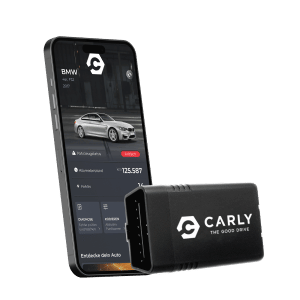
Carly is a top-tier OBD scanner app recognized for its robust capabilities and user-friendly design. Recommended by TUV Nord and Sixt, Carly simplifies car diagnostics, especially for BMW vehicles. It is compatible with any petrol vehicle sold in the EU since 2001, making it a versatile choice for many car owners.
Carly offers a comprehensive solution for checking your car’s electronic system or clearing a check engine light. The app runs smoothly on Android auto platforms and provides detailed insights into your car’s electronic brain. Here are its key features and usage.
Key Features of Carly
Carly boasts a wide range of advanced features. One standout capability is car coding, enabling users to customize functions across multiple car brands, including activating or deactivating specific features. The app also facilitates diagnostics by accessing data from different control units in the vehicle, enhancing your understanding of the car’s health.
The app can read and clear diagnostic trouble codes, helping you identify and address engine issues promptly. Users also benefit from repair videos that provide step-by-step instructions, making DIY maintenance more straightforward.
How to Use Carly
Using Carly is straightforward. Follow these steps:
- Download the app.
- Purchase the Carly adapter, which connects to your vehicle’s OBD-2 port.
- Start the ignition.
- Pair the adapter with your Android device via Bluetooth.
The app then allows you to navigate its features through a user-friendly file screen interface.
From reading diagnostic trouble codes to customizing your vehicle settings, Carly offers a seamless experience. Access vital information about your car’s performance and address any issues that arise, ensuring your vehicle remains in optimal condition.
Torque Pro (OBD2 & Car)
Torque Pro is a powerhouse in the OBDII app world. It is compatible with all OBD2-compliant vehicles manufactured from 1996 onwards in the US and from 2001 in the EU, offering broad compatibility. The app uses a subscription model, with weekly, monthly, and yearly payment options for premium features, including the pro version.
Torque Pro stands out for its real-time monitoring capabilities. Users can track sensor readings and performance metrics instantly, using the device’s built-in GPS and accelerometer for advanced features like skid pad measurements and racing track analytics.
The customizable dashboard allows users to personalize their experience by selecting from multiple themes and gauges displays to suit their preferences.
BlueDriver OBD2 Scan Tool
BlueDriver is a favorite among mechanics for its comprehensive diagnostics, typically found only in professional tools. It offers advanced diagnostics, including reading and clearing trouble codes for systems like ABS and Airbag. This tool provides real-time health monitoring of vehicle systems while the driver is driving, enhancing understanding of vehicle performance.
The application offers the following features:
- Connects to a Bluetooth-enabled sensor, eliminating the need for wired connections.
- Compatible with all gas-powered vehicles manufactured from 1996 onwards, making it a versatile choice.
- Has no subscription fees, providing full access to free features after a single purchase through a bluetooth connection and bluetooth le.
Car Scanner ELM OBD2 App
The Car Scanner ELM OBD2 App is a feature-packed tool offering a wealth of functionalities. It can monitor dozens of vehicle parameters, providing a comprehensive overview of your car’s health. The app includes an acceleration test feature that records the time taken to reach specified speed ranges, making it a favorite among performance enthusiasts.
Custom features of the Car Scanner app include a customizable dashboard, the ability to change sensor data format, and the option to add warnings. Available from the website or Google Play, this app ensures you have all the tools needed for effective car diagnostics.
FIXD – Vehicle Health Monitor
FIXD simplifies car diagnostics by:
- Translating fault codes into simple terms, making it easier for users to understand necessary maintenance actions.
- Decoding over 7,000 diagnostic trouble codes.
- Translating these codes into clear, everyday language to fix issues effectively.
A standout feature is its ability to connect multiple FIXD sensors to a single smartphone, allowing monitoring of various vehicles at once. This makes FIXD an excellent choice for families or car enthusiasts with multiple cars.
OBD Auto Doctor
OBD Auto Doctor is a versatile tool with the following features:
- Compatible with all ELM327-based OBD scan tools using ELM version 1.2 or newer
- Allows users to export diagnostic data in CSV format, facilitating easier analysis and record-keeping
- Provides real-time sensor tracking for various vehicle parameters, making it a reliable choice for detailed diagnostics, including obd fusion.
Whether monitoring engine RPM, coolant temperature, or other critical metrics, OBD Auto Doctor provides the insights needed to keep your vehicle running smoothly. Its compatibility with multiple control units and data export features make it a strong contender in the OBDII app market.
InCarDoc Pro
InCarDoc Pro offers high-level diagnostics to help users understand their car’s health. It supports various adapter types, including Bluetooth and Wi-Fi, for seamless connectivity. The app also features a compatibility check to determine if a vehicle meets OBD-II standards, ensuring you have the right tools for effective diagnostics.
With its user-friendly interface, InCarDoc Pro allows users to read and clear diagnostic trouble codes, including the Check Engine Light, and track real-time data like engine RPM, coolant temperature, and vehicle speed. This makes it a highly recommended app for anyone serious about car maintenance.
DashCommand (IOS)
DashCommand is primarily an OBDII app for iOS but also supports Android devices, making it a versatile option for users with multiple platforms. The app connects to your vehicle via Bluetooth and displays critical information like RPM, speed, and engine temperature.
Beyond basic diagnostics, DashCommand allows users to monitor performance metrics like fuel consumption, throttle position, and diagnostic trouble codes. It also enables logging of live data for detailed analysis and performance tracking, making it a comprehensive tool for any car owner.
HobDrive Premium OBD2 App
HobDrive Premium is an advanced diagnostic tool appreciated by car enthusiasts for its range of features and ease of use. It offers comprehensive vehicle data access and is compatible with a wide range of OBD2 vehicles, as well as many non-OBD2 models. This broad compatibility makes HobDrive a versatile choice.
The app is competitively priced, offering excellent value for the features provided. Its user-friendly interface ensures that even those new to car diagnostics can navigate and utilize its capabilities effectively, making it a preferred choice.
Essential Features to Look For in an OBDII App
When selecting an OBDII app, consider several essential features. The app should provide real-time data for various vehicle parameters, allowing you to monitor performance metrics instantly. Displaying diagnostic trouble codes (DTC) is fundamental, as it helps identify issues that need attention.
Displaying freeze frame data is also crucial for understanding sensor readings when a fault code is generated. Custom pids allow users to monitor specific data points tailored to their own pids vehicle’s needs, enhancing diagnostic capabilities.
Benefits of Using OBDII Apps
OBDII apps provide real-time information about vehicle performance, detect issues, and retrieve diagnostic trouble codes. These apps make vehicle diagnostics accessible for everyday users, reducing the need for professional diagnostic tools. They can display diagnostic trouble codes (DTCs) and offer solutions for issues detected in the vehicle.
Once connected, OBDII apps provide access to real-time data and receiving data diagnostics. This allows users to perform DIY maintenance with guidance from apps like Carly, which can save on repair costs. The connection enables a seamless experience for users, making it easier for the mechanic to understand the vehicle’s needs.
Estimating fuel economy, detecting issues like overheating, and tracking trip parameters with extra features further enhance their helpful utility.
How to Choose the Right OBDII App for Your Needs
Choosing the right OBDII app involves considering several factors. Evaluate the app’s compatibility with your vehicle model, as some apps may not support specific makes or models. Assess the app’s features, such as live data streaming and diagnostic trouble code reading, to ensure they align with your diagnostic needs.
Additionally, some apps provide automatic maintenance reminders tailored to your vehicle’s make and model, which can be incredibly useful for staying on top of regular maintenance tasks. By taking these factors into account, you can select an OBDII app that best meets your requirements and ensures your vehicle remains in optimal condition.
Summary
In summary, OBDII apps for Android have revolutionized the way we approach car diagnostics and maintenance. From Carly’s advanced coding features to Torque Pro’s customizable dashboards and BlueDriver’s professional-grade diagnostics, there is an app to suit every car owner’s needs. These tools provide real-time data, help identify and clear fault codes, and offer practical solutions for vehicle issues.
Choosing the right app involves evaluating compatibility, features, and your specific diagnostic needs. By making an informed choice, you can take control of your car’s health and ensure it runs smoothly for years to come. Embrace the power of OBDII apps and experience the convenience and peace of mind they bring to car maintenance.
Frequently Asked Questions
What does the Carly service provide for car owners?
Carly offers comprehensive services for car owners by enabling them to check their vehicle’s condition, clear fault codes, and perform DIY maintenance, all while maximizing savings. With this app, you can stay on top of your car’s health effortlessly.
How can users diagnose their car using the Carly scanner?
To diagnose your car with the Carly scanner, simply plug it in, start the ignition, and connect the Carly app via Bluetooth to access vehicle data and perform diagnostics. This streamlined process will enable you to effectively identify any issues with your vehicle.
What is the purpose of the OBD-II socket in vehicles?
The OBD-II socket allows diagnostic tools to connect to a vehicle’s systems, facilitating the access and analysis of various performance and error parameters. This is essential for maintaining your vehicle’s health and addressing any potential issues efficiently.
Who recommends the Carly service?
Carly is recommended by TUV Nord and Sixt for its strong diagnostic capabilities and ease of use.
What type of help can users get from the Carly Community?
Users can receive assistance for car-related issues from the Carly Community, including shared experiences, troubleshooting advice, and solutions from fellow Carly users.